
10 Lists of the Best Laptop for Graphic Design to Consider
In 2026, choosing the best laptop for graphic design is essential as creative demands continue to rise. According to Business Research Insights, the global graphic design software market is projected to surpass USD 11 billion. This projection proves that design-driven industries are rapidly expanding.
At the same time, designers increasingly rely on Adobe Creative Suite, 3D illustration, animation, UI/UX, and motion graphics. As a result, modern workflows demand far more power than ever before. To support these needs, discover which laptops truly meet the challenge below!
Key Takeaways
- Choosing the best laptop for graphic design depends on performance, color accuracy (Delta E < 2), and workflow needs.
- Modern designers require powerful CPUs, dedicated GPUs, and high-gamut displays (DCI-P3) for Adobe, 3D, and motion work.
10 Best Laptop for Graphic Design Recommendations for 2026
Below, we’ve handpicked 10 choices of a laptop for digital artists to work more efficiently, creatively, and without constraints. Decide which one works best for you!
1. Acer Swift Go 14 (2025)

Price: Starting at $749
Specs: Intel Core Ultra 5, Intel Arc Graphics, 16GB RAM, 512GB SSD, 14-inch 2.8K OLED (100% DCI-P3).
Pros: The best laptop for graphic design students with a VESA Certified DisplayHDR True Black 500 that makes colors pop.
Cons: Integrated graphics are not suitable for heavy 3D rendering or complex video effects.
Best for: Students and social media content creators.
Also Read: Skills Needed to Be a Graphic Designer: Top 10 Key Skill
2. ASUS Vivobook Pro 15 OLED (2025)

Price: Starting at $999
Specs: Intel Core Ultra 7, NVIDIA RTX 4050, 16GB RAM, 1TB SSD, 15.6-inch 3K 120Hz OLED.
Pros:
- The intuitively integrated ASUS DialPad on the touchpad speeds up Adobe workflows.
- The Pantone Validated display ensures absolute color accuracy.
Cons: The chassis is partially plastic, which feels less premium than the ProArt line.
Best for: Multi-disciplinary designers using Photoshop and After Effects.
3. Microsoft Surface Laptop 7th Edition (2024/2025)

Price: Starting at $1,099
Specs: Snapdragon X Elite, Qualcomm Adreno GPU, 16GB RAM, 13.8-inch PixelSense Touchscreen.
Pros:
- Incredible battery life for all-day designing on the go.
- 3:2 screen ratio offers more vertical space for UI design.
Cons: Some legacy x86 plugins may require emulation, which can slightly impact speed.
Best for: UI/UX designers and layout artists (Figma, InDesign).
4. Apple MacBook Air 15-inch (2025)

Price: Starting at $1,299
Specs: Apple M4 Chip (10-core GPU), 16GB Unified Memory, 15.3-inch Liquid Retina Display.
Pros: The best laptop for graphic design that supports dual external monitors while the lid is open.
Cons: Limited port selection, so you need a USB-C hub for peripherals.
Best for: Freelance brand designers and digital illustrators.
Also Read: How to Become a Graphic Designer Without a Degree: 7 Key Steps
5. HP Spectre x360 16 (2025)

Price: Starting at $1,599
Specs: Intel Core Ultra 7, NVIDIA RTX 4050, 32GB RAM, 16-inch 2.8K OLED Touchscreen.
Pros: Includes a high-precision stylus with 4,096 levels of pressure sensitivity for natural drawing.
Cons: The 16-inch frame is significantly heavier than traditional laptops.
Best for: Digital painters and concept artists who draw directly on the screen.
6. ASUS ProArt P16 (2025)
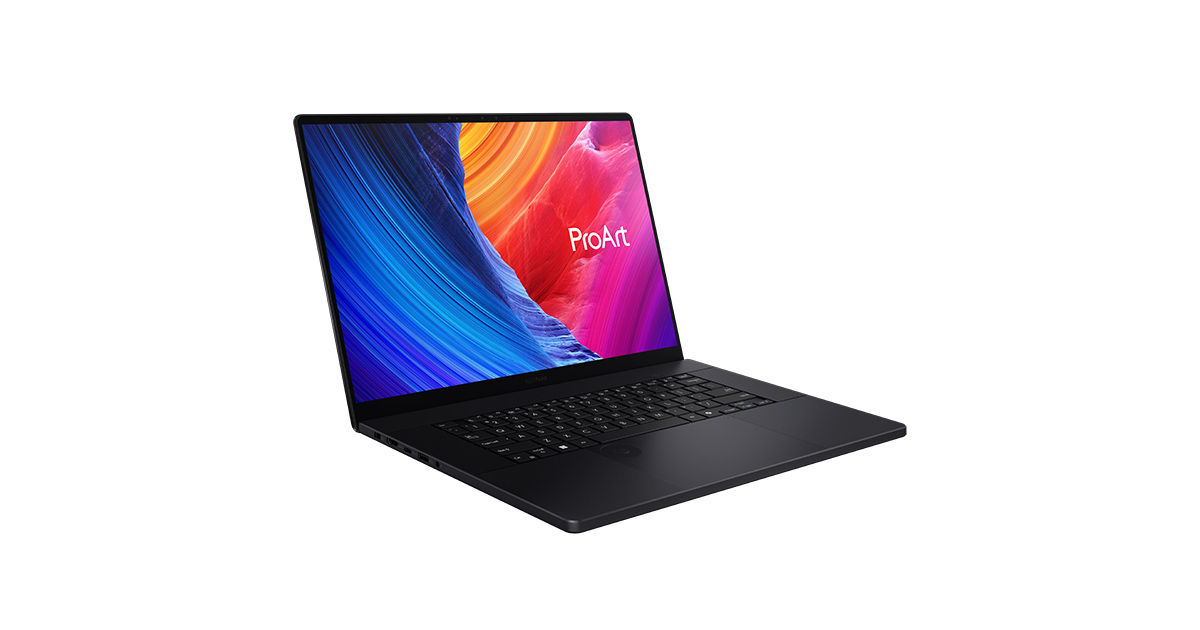
Price: Starting at $1,899
Specs: AMD Ryzen AI 9 HX 370, NVIDIA RTX 5060, 32GB RAM, 16-inch 4K OLED Touch.
Pros: Strictly factory-calibrated screen with Delta E < 1 for absolute color fidelity.
Cons: The sleek black finish is a major fingerprint magnet.
Best for: Professional photographers and high-end photo retouchers.
7. Dell XPS 16 9650 (2025)

Price: Starting at $2,199
Specs: Intel Core Ultra 9, NVIDIA RTX 50-series, 32GB LPDDR5X, 16.3-inch 4K+ OLED.
Pros: The best laptop for graphic design with futuristic glass haptic touchpad and minimalist CNC aluminum design.
Cons: The touch-capacitive function row can be frustrating for those who rely on physical keys.
Best for: Art directors and agency-side creatives.
Also Read: Graphic Design Trend 2026: 10 Visual Creativity Trends to Watch
8. Lenovo Yoga Pro 9i Gen 10 (2025)

Price: Starting at $2,399
Specs: Intel Core Ultra 9, NVIDIA RTX 5070, 64GB RAM, 16-inch 3.2K Mini-LED (165Hz).
Pros: The Mini-LED panel offers HDR1000 and 1,200 nits brightness for high-dynamic-range content.
Cons: The Mini-LED screen consumes battery much faster than standard IPS or OLED panels.
Best for: Motion graphics and video-centric design (After Effects/Premiere).
9. Apple MacBook Pro 14/16 (2025)
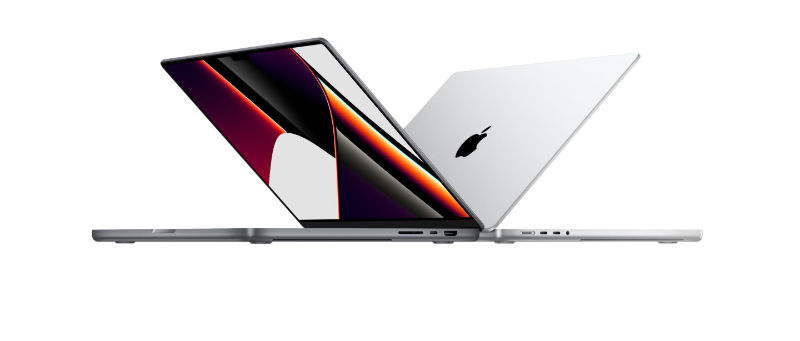
Price: Starting at $2,499 (16-inch)
Specs: Apple M4 Pro/Max Chip, up to 128GB Unified Memory, Liquid Retina XDR Display.
Pros:
- The best laptop for graphic design with gold standard for display quality with 1,600 nits peak brightness.
- Extensive port selection, including SDXC slot and MagSafe 3.
Cons: After-purchase upgrades are impossible.
Best for: Power users, 3D artists, and professional studios.
10. ASUS ProArt Studiobook 16 OLED (2025)

Price: Starting at $2,999
Specs: AMD Ryzen™ AI 9 HX 370, NVIDIA® GeForce RTX™ 4070, 64GB LPDDR5X RAM, 16-inch 4K OLED Touchscreen.
Pros:
- High-end software optimization for stable performance during complex 3D rendering and 8K video editing.
- 100% DCI-P3 color gamut and Pantone Validated for museum-grade visuals.
Cons: The heavy build is designed as a mobile workstation.
Best for: Professional graphic designers, 3D environment artists, and high-end agency creatives.
Also Read: Top 7 Graphic Design Best Software for 2026 for Designers
Power Your Ideas with the Best Laptop for Graphic Design
Investing in top laptops for graphic design in 2025 and 2026 is a vital move toward building a faster and more reliable creative workflow. However, high-end hardware is only half the battle. The true impact of your work depends on the quality of your visual elements.
To truly elevate your projects, pairing your new tech with professional fonts is a game-changer. HansCo Studio presents polished typefaces for a cohesive feel to your UI/UX and branding work. With high-quality fonts, you can bridge the gap between raw processing power and sophistication for impactful digital design.